


One of the best infrastructure announcements of the year came at re:invent – AWS has launched EKS Auto Mode to reduce Kubernetes operational overhead for simple clusters.
In this blog, I’ll highlight the top 5 considerations that you should be aware of as you adopt Auto Mode.
With Auto Mode, AMIs and ec2 instances are automatically selected for your workload. Auto mode will manage the AMI lifecycle, ensuring that new AMIs are automatically upgraded on your nodes in a rolling deployment (respecting the Kubernetes scheduling constraints you specify).
AWS Karpenter is also part of Auto Mode, and it will automatically and dynamically select the most optimal compute instances and scale the cluster automatically for capacity as well. This also means that the cluster will be scaled down automatically if utilization is low.
Operational Consideration: Customers requiring custom AMIs and won’t be able to use Auto Mode which only supports EKS AMIs.
With Auto Mode, EKS can automatically install and upgrade the 6 main AWS Managed Add-Ons: KubeProxy, CoreDNS, ALB Controller, VPC CNI, EBS CSI, and Karpenter. When you upgrade the control plane, EKS Auto Mode will automatically update these Add-ons.
Operational Consideration: In Auto Mode, the underlying CNI is restricted to AWS’ VPC CNI plug-in. This can be a limitation if your organization prefers or requires a different CNI (e.g., Calico, Cilium) for enhanced observability, eBPF support, or advanced networking policies.
Just like today, all other add-ons must still be installed, managed, and upgraded by you. This list of “Customer-Managed Application Add-ons” includes key add-ons like cert-manager, ArgoCD, External Secrets Operator, Istio, External DNS, CrossPlane, KEDA, Prometheus, Alertmanager, Fluentd, Grafana, Loki, Keycloak, Contour, Nginx Ingress Controller, Cilium, Calico, Argo Rollouts, and all Database Add-Ons.
Operational Consideration: You must configure Auto Mode to stall upgrades until you verify compatibility for: 1. Application Add-ons, 2. kernel-dependent custom tooling, and 3. Add-ons which require specific kernel versions. Ideally, you should use operational safety tools to uncover hidden dependencies and unknown incompatibilities before Auto Mode upgrades your clusters.
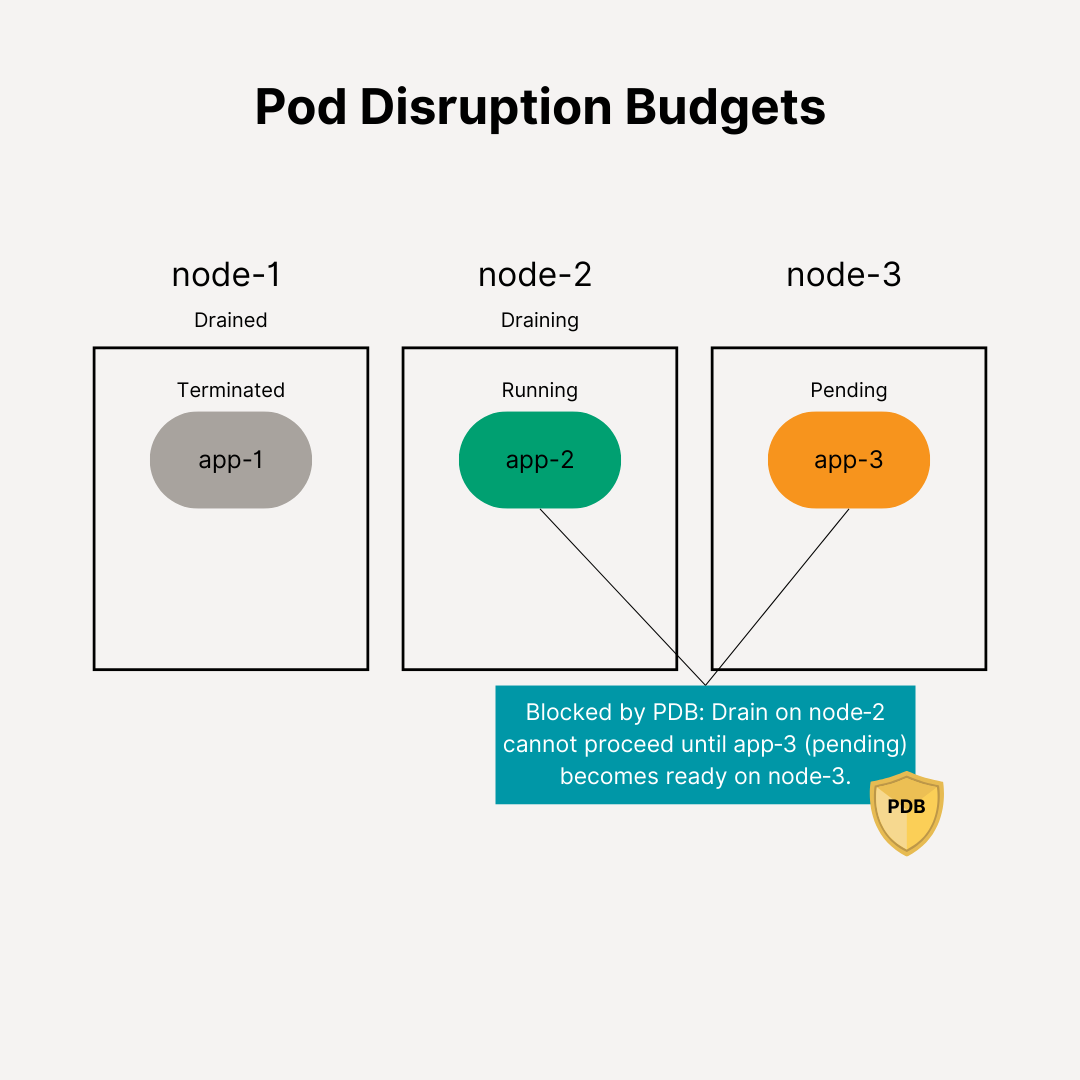
You are still responsible for getting applications migrated off of deprecated/removed APIs and fixing misconfigured Pod Disruption Budgets (PDBs) prior to an Auto Mode upgrade.
Operational Consideration: Auto Mode respects PDBs for 21 days. Afterwards EKS Auto Mode will proceed with the upgrade. Ensure your application teams know this timeline and update their workloads and PDBs prior to the upgrade.
Auto Mode introduces a 12% surcharge on nodes, so your EKS-attached EC2 spend will increase proportionally. For instance, if you are spending $1M to $10M annually on EC2 nodes then your spend will increase between $120K to $1.2M /yr.
You should adopt Auto Mode but take a crawl-walk-run approach. Start with simple container workloads, automate safety and operational practices, and then grow from there.
For example, if you are running simple containerized workloads elsewhere and thinking of migrating them to EKS, you can now deploy and manage all container workloads using EKS Auto Mode. Or if have clusters that aren’t running Datapath Add-ons (Istio, Contour, Cilium, etc.) and Stateful Add-Ons (e.g. Database Add-Ons) then you can move these clusters to EKS Auto Mode. (Typically clusters running CI jobs fit this criteria.)
If you are an existing EKS user, most of your clusters are already running Application Add-Ons which require special care and attention. You should have the right operational safeguards and tooling to ensure that all add-on dependencies are resolved, all compatibility have been verified, and applications have been updated to work with the next version of EKS.
One of the best infrastructure announcements of the year came at re:invent – AWS has launched EKS Auto Mode to reduce Kubernetes operational overhead for simple clusters.
In this blog, I’ll highlight the top 5 considerations that you should be aware of as you adopt Auto Mode.
With Auto Mode, AMIs and ec2 instances are automatically selected for your workload. Auto mode will manage the AMI lifecycle, ensuring that new AMIs are automatically upgraded on your nodes in a rolling deployment (respecting the Kubernetes scheduling constraints you specify).
AWS Karpenter is also part of Auto Mode, and it will automatically and dynamically select the most optimal compute instances and scale the cluster automatically for capacity as well. This also means that the cluster will be scaled down automatically if utilization is low.
Operational Consideration: Customers requiring custom AMIs and won’t be able to use Auto Mode which only supports EKS AMIs.
With Auto Mode, EKS can automatically install and upgrade the 6 main AWS Managed Add-Ons: KubeProxy, CoreDNS, ALB Controller, VPC CNI, EBS CSI, and Karpenter. When you upgrade the control plane, EKS Auto Mode will automatically update these Add-ons.
Operational Consideration: In Auto Mode, the underlying CNI is restricted to AWS’ VPC CNI plug-in. This can be a limitation if your organization prefers or requires a different CNI (e.g., Calico, Cilium) for enhanced observability, eBPF support, or advanced networking policies.
Just like today, all other add-ons must still be installed, managed, and upgraded by you. This list of “Customer-Managed Application Add-ons” includes key add-ons like cert-manager, ArgoCD, External Secrets Operator, Istio, External DNS, CrossPlane, KEDA, Prometheus, Alertmanager, Fluentd, Grafana, Loki, Keycloak, Contour, Nginx Ingress Controller, Cilium, Calico, Argo Rollouts, and all Database Add-Ons.
Operational Consideration: You must configure Auto Mode to stall upgrades until you verify compatibility for: 1. Application Add-ons, 2. kernel-dependent custom tooling, and 3. Add-ons which require specific kernel versions. Ideally, you should use operational safety tools to uncover hidden dependencies and unknown incompatibilities before Auto Mode upgrades your clusters.
You are still responsible for getting applications migrated off of deprecated/removed APIs and fixing misconfigured Pod Disruption Budgets (PDBs) prior to an Auto Mode upgrade.
Operational Consideration: Auto Mode respects PDBs for 21 days. Afterwards EKS Auto Mode will proceed with the upgrade. Ensure your application teams know this timeline and update their workloads and PDBs prior to the upgrade.
Auto Mode introduces a 12% surcharge on nodes, so your EKS-attached EC2 spend will increase proportionally. For instance, if you are spending $1M to $10M annually on EC2 nodes then your spend will increase between $120K to $1.2M /yr.
You should adopt Auto Mode but take a crawl-walk-run approach. Start with simple container workloads, automate safety and operational practices, and then grow from there.
For example, if you are running simple containerized workloads elsewhere and thinking of migrating them to EKS, you can now deploy and manage all container workloads using EKS Auto Mode. Or if have clusters that aren’t running Datapath Add-ons (Istio, Contour, Cilium, etc.) and Stateful Add-Ons (e.g. Database Add-Ons) then you can move these clusters to EKS Auto Mode. (Typically clusters running CI jobs fit this criteria.)
If you are an existing EKS user, most of your clusters are already running Application Add-Ons which require special care and attention. You should have the right operational safeguards and tooling to ensure that all add-on dependencies are resolved, all compatibility have been verified, and applications have been updated to work with the next version of EKS.



.png)


.png)

.png)












.png)



.jpg)